Drone mapping has truly revolutionized industries from construction and agriculture to surveying and environmental monitoring. But getting those crisp, accurate aerial maps isn’t just about having a fancy drone; it’s about nailing the camera settings. Without the right setup, even the most expensive drone camera can deliver blurry, inconsistent data, rendering your efforts useless.
If you’re looking to elevate your drone mapping projects and achieve professional-grade results, you’ve come to the right place. In this comprehensive guide, we’re diving deep into the best camera settings for drone mapping, explaining why each one matters. Plus, we’ll review five top-tier drones that are perfectly suited to help you capture every detail with precision and clarity. Let’s get mapping!
Why Camera Settings Matter for Drone Mapping
Think of drone mapping as a puzzle where each image is a piece. For the puzzle to come together seamlessly and accurately (which happens during photogrammetry processing), every piece needs to be perfectly clear, well-exposed, and consistently captured. Incorrect camera settings can lead to:
- Blurry images: Caused by too slow a shutter speed, especially in windy conditions or during fast flight.
- Inconsistent exposure: Leading to uneven lighting across your map, making post-processing a headache.
- Poor detail resolution: Essential for tasks like volumetric calculations or identifying small features.
- Chromatic aberration or noise: Affecting the overall quality and accuracy of your geospatial data.
Mastering these settings is a crucial step in ensuring your drone mapping data is reliable and ready for analysis.
The 5 Essential Camera Settings for Drone Mapping
Getting these settings right is fundamental for high-quality data acquisition. Here’s what you need to focus on:
1. Shutter Speed: Freeze the Action
What it is: The length of time your camera’s sensor is exposed to light.
Why it matters for mapping: When a drone flies, everything beneath it is moving relative to the camera. A slow shutter speed will result in motion blur, significantly impacting the clarity and sharpness of your images. For accurate mapping, you want to “freeze” the ground beneath.
- Rule of Thumb: Aim for a shutter speed of at least 1/Flight_Speed (in mph) * 200. For example, if flying at 10 mph, aim for 1/2000s or faster. A common baseline is 1/500s or faster, depending on your drone’s speed and altitude.
- Consider this: Brighter conditions allow for faster shutter speeds without underexposing. You might need to adjust other settings like ISO or Aperture in darker conditions.
2. Aperture (f-stop): Control Depth and Light
What it is: The opening in the lens that controls how much light enters the camera and the depth of field.
Why it matters for mapping: For mapping, you generally want as much of your scene in focus as possible. A higher f-stop number (e.g., f/5.6, f/8) means a smaller opening and a larger depth of field, keeping more of your terrain sharp.
- Rule of Thumb: Start with an aperture around f/5.6 or f/8. Some high-end mapping drones have fixed apertures, simplifying this.
- Consider this: Going too high (e.g., f/11 or f/16) can sometimes introduce a phenomenon called diffraction, which can slightly reduce sharpness, especially with smaller sensors. Find the sweet spot for your specific lens.
3. ISO: Manage Sensitivity and Noise
What it is: Your camera’s sensitivity to light.
Why it matters for mapping: A lower ISO (e.g., 100, 200) means less sensitivity but produces cleaner images with less digital noise. For mapping, where detail and clarity are paramount, minimizing noise is critical.
- Rule of Thumb: Always aim for the lowest possible ISO, ideally ISO 100 or 200.
- Consider this: Only increase ISO if absolutely necessary to achieve a fast enough shutter speed and proper exposure in low-light conditions. Even then, try to keep it below ISO 400.
4. White Balance: Ensure Color Consistency
What it is: Adjusts the color temperature of your image to make white objects appear truly white.
Why it matters for mapping: Consistent and accurate color representation is vital for visual inspection, classification, and change detection in your map data.
- Rule of Thumb: Set white balance manually to a preset (e.g., “Daylight” or “Cloudy”) or a specific Kelvin temperature (e.g., 5500K for daylight). Avoid “Auto White Balance” during mapping missions, as it can cause variations between images.
- Consider this: If your mapping mission spans several hours or involves significant changes in weather, you might need to adjust white balance mid-mission or perform color correction in post-processing.
5. Focus: Pinpoint Sharpness
What it is: The point at which your lens creates the sharpest image.
Why it matters for mapping: For aerial mapping, almost everything beneath the drone is effectively at “infinity” focus. An unfocused image is useless for data processing.
- Rule of Thumb: Set your camera to “infinity focus” manually. If manual focus isn’t an option, use “Auto Focus” but ensure it locks onto a distant ground object before starting your mission and disable it if possible to prevent refocusing mid-flight.
- Consider this: Many drones designed for mapping have a fixed-focus lens or very reliable autofocus. Always double-check this before takeoff.
By meticulously adjusting these best camera settings for drone mapping, you’ll lay the groundwork for high-quality, actionable data. Now, let’s look at some excellent drones that can help you achieve these settings and capture stunning aerial data.
Our Top 5 Drones for Mastering Aerial Mapping
Finding the right drone that combines flight stability, camera quality, and smart features is key for effective drone mapping. Here are our picks for drones that excel in these areas:
LE-IDEA GPS Drones with Camera for Adults 4k, IDEA36LCD
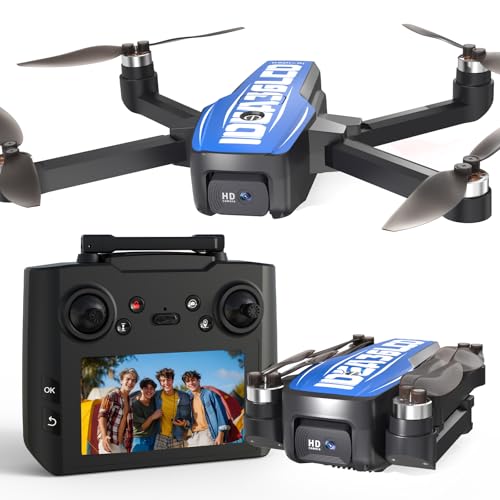
The LE-IDEA IDEA36LCD stands out as a fantastic entry point for aspiring drone mappers, especially for those who prefer to keep their smartphone tucked away. Its unique 4.5-inch LCD screen integrated into the controller provides real-time flight data and camera views, freeing you from phone dependency during critical mapping missions. With a 4K HD camera offering a 45° electric adjustable angle and stable flight thanks to its brushless motor and dual GPS/Optical Flow positioning, it delivers clarity for landscape and action shots, making it a versatile tool for both mapping practice and recreational aerial photography.
- 4K HD Camera + 5G WiFi FPV Transmission: Features a 45° electric adjustable camera for movie-level aerial photography and fast, low-latency FPV.
- Brushless Motor + 2500mAh Battery: Offers stable flight with up to level 3 wind resistance and 22 minutes of flight time, with Type-C fast charging.
- 4.5-inch LCD Screen + 32 GB SD Storage: Controller displays real-time data and camera views, eliminating smartphone reliance, with built-in 32GB SD card slot for 4K video/photos.
- Optical Flow + GPS Dual Positioning: Achieves centimeter-level indoor hovering and outdoor accuracy, with one-button return for safety.
- Diverse Functions + Ultra Portable Design: Includes one-click takeoff/landing, headless mode, follow me, waypoint flight, circle flight, in a lightweight, foldable body.
- Customer Service Support: Professional team available for operational, function, and maintenance assistance.
Pros:
– Integrated LCD screen on controller for phone-free operation.
– Built-in 32GB SD card slot for direct recording.
– Brushless motor provides good wind resistance and quiet operation.
– Dual positioning system enhances stability and safety.
– Beginner-friendly with multiple smart flight modes.
– Adjustable camera angle for flexible shooting.
Cons:
– 22 minutes of flight time per battery might be short for extensive mapping projects.
– 4K resolution might not be sufficient for highly detailed professional photogrammetry.
User Impressions: Customers often highlight the convenience of the built-in LCD screen and SD card, praising it as a user-friendly feature that simplifies the flying experience. The drone’s stability and ease of control, even for beginners, also receive positive remarks, making it a popular choice for learning and casual aerial projects.
Bwine F7GIM Pro Drone with 6K UHD Camera, 3-Axis…

The Bwine F7GIM Pro redefines what a prosumer drone can offer, especially for demanding mapping tasks. Its “Groundbreaking Industrial Aesthetic Design” is more than just looks, combining visual identity with aerodynamically optimized performance. The star of the show is its 6K Ultra HD camera paired with a 3-axis brushless gimbal, ensuring incredibly stable and detailed imagery even in challenging conditions. With an astonishing 70-minute flight time and a 10,000ft transmission range, this drone is built for extended missions, capturing seamless 4K real-time video, and even excelling in low-light with its Night Mode 2.0.
- 6K Ultra HD + 3-axis brushless gimbal: Professional imaging system with imported sensors for ultra-clear 6K photos and smooth 4K/30fps video, enhanced by 60% dynamic stability from the gimbal.
- Friendly to Beginners: Features one-button takeoff, automatic return, intelligent novice mode, and enhanced low-altitude stability with TOF + GPS + millimeter-wave radar.
- 10,000ft Ultra-Range Transmission丨70-Minute Fight Time: Latest digital image transmission via upgraded APP (Bwine Mini) for seamless 4K real-time video, and double the industry average flight time.
- Pro-Level Aerial Intelligence丨Cinematic Shots at One Touch: GPS Smart Modes like cruise control, follow me, orbit flight, waypoint planning, and Night Mode 2.0 reducing noise by 70%.
- Worry-Free Service Promise: Includes a full English manual, 5 guidance videos, 24/7 bilingual support, lifetime warranty, and free explosion-proof case.
- Groundbreaking Industrial Aesthetic Design: Exclusive texture body with 3D laser-etched texture and bold orange accents.
Pros:
– Exceptional 6K photo resolution and stable 4K video for detailed mapping.
– Industry-leading 70-minute flight time for extended coverage.
– Superior stability from the 3-axis brushless gimbal.
– Impressive 10,000ft digital image transmission range.
– Advanced smart flight modes and Night Mode 2.0 enhance versatility.
– Very beginner-friendly features despite its professional capabilities.
Cons:
– Wired digital transmission might be less convenient than Wi-Fi for some users.
– “70-Minute Flight Time” is likely achieved with multiple batteries and intelligent battery management.
User Impressions: Users are consistently impressed by the Bwine F7GIM Pro’s robust build, stunning image quality, and especially the incredibly long flight duration, which is a major plus for mapping large areas. Many appreciate its user-friendly interface, making it accessible for those transitioning from hobbyist to more professional applications.
Bwine F7MINI 8K Photo Drones with Camera for Adults 4K…

The Bwine F7MINI is a game-changer, packing advanced aerial photography technology into a drone weighing under 249 grams – meaning no FAA registration is needed! This makes it incredibly versatile and freedom-friendly for mapping projects in various locations. Its standout feature is the ability to capture stunning 8K UHD photos with a Japanese-imported 1/2-inch CMOS sensor and F1.8 aperture lenses. Combined with a 3-axis brushless gimbal, 6-level wind resistance, an astounding 20,000ft real-time control range, and a marathon 96-minute flight time (with three batteries), the F7MINI punches far above its weight, offering professional-grade results in an ultra-portable package.
- The Newest Unique 249g Drone: Under 249 grams, avoiding FAA registration, with a sleek design and advanced aerial photography technology.
- Up to 8K UHD Photo, Stunning, Amazing: Japanese-imported 1/2-inch CMOS sensor and F1.8 lenses capture 8K photos (8000x6000P) and 4K video, with 90° wide angle and 5x zoom.
- 6-Level Wind Resistance: Upgraded 3-Axis brushless gimbal and 1503 brushless motor enhance stability by 300%, resisting winds up to 31 mph.
- 20,000ft Real-Time Control: Proprietary digital transmission (non-WiFi) boasts 20,000ft max range and stable 4.5km transmission in urban areas with <0.1s latency.
- 96-Min Marathon Flight|Triple-Battery Freedom: Comes with three high-density batteries, each providing 32 mins, totaling 96 mins of flight time.
- GPS Smart-Pro Shots in One Tap: Features Cruise Control, ActiveTrack, Orbit, and Waypoints for professional-grade footage.
- Safe Flight|Beginner-Friendly: Includes Smart RTH (low battery, signal lost), Dynamic Home Point, and a 120dB Drone Locator buzzer.
Pros:
– No FAA registration required due to its sub-249g weight.
– Exceptional 8K photo resolution for incredibly detailed mapping.
– Outstanding 96-minute combined flight time for extended missions.
– Remarkable 20,000ft long-range digital transmission.
– Excellent wind resistance for stable shots in challenging conditions.
– Comprehensive smart flight and safety features, ideal for beginners and pros.
Cons:
– 8K resolution is for photos; video is 4K, which might be a consideration for video-based mapping.
– The “mini” size, while convenient, means a smaller sensor than some larger professional drones.
User Impressions: Users rave about the F7MINI’s portability and the sheer quality of its 8K photos, especially given its weight class. The extended flight time and robust wind resistance are frequently praised, making it a reliable tool for on-the-go mapping and high-quality image capture without the hassle of FAA registration.
Ruko F11PRO 2 Drone with 6K Camera for Adults, 3-Axis…

The Ruko F11PRO 2 is designed for those who want to capture life’s moments and mapping data with cinematic quality. Its 6K photos and smooth 4K/30fps video, powered by an advanced image sensor lens and a 3-axis brushless gimbal, ensure exceptional clarity and stability. With two batteries providing a total of 70 minutes of flight time and an impressive 10,000-foot long-range digital transmission, it’s ready for extended aerial adventures. Intelligent GPS flight modes like follow-me and waypoint planning simplify complex shots, while Night Mode further extends its utility, making it a versatile tool for both recreational pilots and aspiring mappers.
- 6K Photos and 4K/30fps Video: Captures crisp 6K photos and smooth 4K/30fps video with a premium image sensor lens.
- Stability Redefined: Features a 3-axis brushless gimbal with enhanced wind resistance for professional aerial footage.
- Extended Flight Time: Two batteries offer a total of 70 minutes of flight time (35 minutes per battery).
- Fly Smarter, Film Better: Intelligent GPS flight modes including follow-me, orbit flight, cruise control, and waypoint planning.
- Nighttime Adventures: Night Mode with frame retention technology enhances aerial photography after dark.
- Super Long Range: Impressive 10,000-foot long-range digital transmission for expansive exploration.
Pros:
– High-resolution 6K photos and clear 4K video.
– Excellent image stability from the 3-axis brushless gimbal.
– Generous 70-minute combined flight time.
– Reliable 10,000-foot digital transmission range.
– Intelligent flight modes simplify complex aerial tasks.
– Night Mode capability for low-light capture.
Cons:
– Requires use of a specific Ruko charger for optimal performance.
– Users must remember to remove the gimbal cover before powering on to prevent damage.
User Impressions: Users frequently praise the F11PRO 2 for its impressive camera quality and stable flight, especially appreciating the capabilities of the 3-axis gimbal. The extended flight time is a significant advantage for many, allowing for longer, more productive sessions, while the intuitive GPS modes make it accessible even for those new to drone mapping.
Gleesfun G11PRO 6K Drone with Camera for Adults, 4K/30fps…

The Gleesfun G11PRO offers an ideal balance of performance and affordability, making it a compelling choice for anyone serious about aerial footage, including mapping. It boasts a sleek design, FAA compliance, and a portable carrying case, ready for any adventure. At its core, the drone features a 3-axis brushless gimbal for silky-smooth flight and a high-performance 6K photo and 4K/30fps video camera with a 1/3.2 inch CMOS sensor, ensuring stunning clarity and detail. Its 10,000ft GQ2.0 digital transmission system, coupled with 70 minutes of flight time (from two smart batteries) and unique Cruise Control technology, empowers users to achieve professional-grade shots and comprehensive mapping with remarkable ease and efficiency.
- 3-Axis Brushless Gimbal: Uses three-axis positioning for precise control of pitch, roll, and yaw, ensuring stable balance and improved image quality in various conditions.
- 6K Photo & 4K/30fps Video: Equipped with advanced high-resolution technology and a 1/3.2 inch CMOS sensor for stunning 6K images and smooth 4K/30fps video.
- Cruise Control: Patented technology simplifies cinematic-quality aerial footage by automatically maintaining stability during flight, including multi-directional 3D aerial photography.
- GQ2.0 Digital Image Transmission System: High-performance two-way, dual-antenna system ensures stable and clear transmission up to 10,000 ft with a plug-and-play wired connection.
- GL2.0 Smart Battery Management System: Two 3200mAh batteries provide up to 70 mins of flight time (35 mins each), with 2.5 hours fast charging and over 300 charge cycles.
- FAA Compliance Confirmed: Meets FAA Remote ID requirements, with a QR code for easy compliance verification.
Pros:
– Impressive 6K photo resolution and smooth 4K video for detailed capture.
– Highly stable 3-axis brushless gimbal for professional-grade footage.
– Unique Cruise Control feature simplifies complex flight paths for mapping.
– Reliable 10,000ft digital transmission system.
– Efficient battery management system with fast charging and extended life.
– FAA Remote ID compliance for worry-free operation.
Cons:
– The 1/3.2 inch CMOS sensor, while good, might offer slightly less low-light performance than larger sensors.
– Wired connection to the remote might be less convenient than Wi-Fi for some users.
User Impressions: Many users find the Gleesfun G11PRO to be an excellent value, delivering high-end features like the 3-axis gimbal and 6K camera at an accessible price point. The “Cruise Control” mode is frequently praised for making complex shots effortless, and the long battery life combined with FAA compliance provides a confident and enjoyable flying experience for mapping and videography alike.
Conclusion
Achieving accurate and high-quality drone mapping results isn’t just about the drone itself; it’s profoundly about understanding and applying the best camera settings for drone mapping. By meticulously controlling shutter speed, aperture, ISO, white balance, and focus, you can ensure your aerial data is crisp, consistent, and ready for serious analysis.
The drones we’ve reviewed today — from the beginner-friendly LE-IDEA with its integrated screen to the high-performance Bwine F7GIM Pro and F7MINI, the reliable Ruko F11PRO 2, and the value-packed Gleesfun G11PRO — all offer robust features and impressive camera capabilities to help you master your aerial surveys. Invest in the right drone, master your settings, and watch your mapping projects reach new heights of precision and professionalism!
FAQ: Drone Mapping Camera Settings & Best Practices
Q1: What are the most crucial camera settings for drone mapping?
A: The most crucial settings are Shutter Speed (fast enough to avoid motion blur), Aperture (to ensure maximum depth of field), ISO (kept as low as possible for minimal noise), White Balance (set manually for consistency), and Focus (set to infinity or locked on a distant object).
Q2: Why is a low ISO important for mapping?
A: A low ISO setting (ideally 100 or 200) minimizes digital noise in your images. For mapping, where clarity and fine detail are critical for accurate photogrammetry and analysis, clean images free from noise are essential. High ISO can obscure details and introduce inconsistencies.
Q3: How does shutter speed affect drone mapping image quality?
A: Shutter speed directly controls motion blur. A slow shutter speed, especially when the drone is moving quickly, will cause blurry images. For drone mapping, you need a fast shutter speed (e.g., 1/500s or faster) to “freeze” the ground and capture sharp, clear images, which are vital for precise reconstruction of 3D models and maps.
Q4: What is the ideal image overlap for drone mapping?
A: For most drone mapping projects, an ideal overlap is typically 75% front overlap (forward motion) and 60% side overlap (between flight lines). For more complex 3D models or vertical structures, you might increase this to 80-85% front and 70-75% side overlap. Sufficient overlap is crucial for successful photogrammetry processing.
Q5: Do I need a 3-axis gimbal for drone mapping?
A: While not strictly mandatory for every single project, a 3-axis gimbal is highly recommended for drone mapping. It provides superior image stability by compensating for the drone’s movements (pitch, roll, yaw), ensuring your camera remains level and your photos are free from blur caused by drone wobble. This leads to much higher quality and more consistent mapping data.
Q6: What drone features are essential for accurate mapping?
A: Essential drone features for accurate mapping include:
* High-quality camera: With a good sensor, adjustable settings, and ideally a global shutter.
* GPS positioning: For precise flight path execution and geotagging of images.
* Stable flight: Achieved through robust motors, flight controllers, and often a 3-axis gimbal.
* Long flight time: To cover larger areas efficiently.
* Waypoint navigation: To program autonomous flight paths for systematic data collection.
Q7: Can I use any consumer drone for mapping?
A: While you can technically use almost any drone with a camera to take pictures, not all consumer drones are suitable for accurate mapping. Drones specifically designed or equipped for mapping often have better cameras, more precise GPS, advanced flight planning capabilities, and more stable gimbals. Using an inadequate drone can lead to inconsistent images, poor geotagging, and ultimately, inaccurate maps.
Q8: What does GSD mean in drone mapping?
A: GSD stands for Ground Sample Distance. It represents the actual distance on the ground that each pixel in your image covers. For example, a GSD of 2 cm means each pixel in your image corresponds to a 2×2 cm square on the ground. A lower GSD indicates higher resolution and more detail in your map, but it usually requires flying lower or using a camera with a longer focal length, impacting flight time and area coverage.